Explained at your level
Ask for a concept explained simply or in more depth, with a worked example, or with the exam traps that usually catch students out.
NEET guides
NEET · AI MENTOR
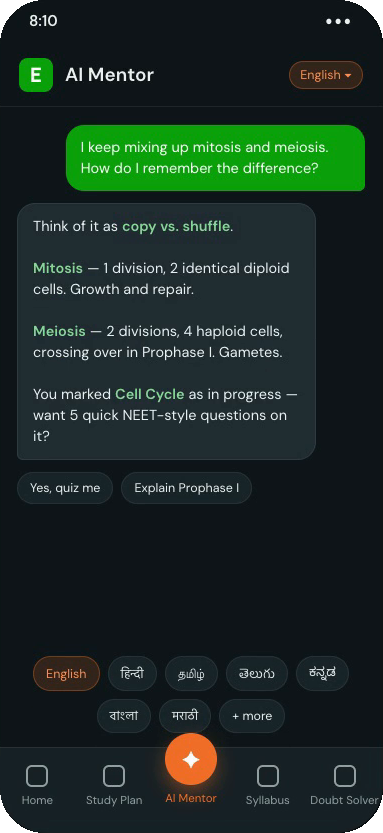
Ask about any NEET concept and get an explanation that draws on the syllabus and on what you are studying. Ask for it simpler, in more depth, with a worked example, or in your own language.
Paid plans
What it does
The mentor is there for the moment a topic stops making sense, whether you are reading a lesson or revising on your own.
Ask for a concept explained simply or in more depth, with a worked example, or with the exam traps that usually catch students out.
Answers draw on the NEET syllabus and your own progress, so the mentor knows which chapter and topic you mean.
Open the mentor from any lesson and it already knows the topic. Close it and you are back where you were reading.
Ask it to quiz you on the topic you have just read, then go back over whatever you missed.
Answers in English, Hindi, Tamil, Telugu, Kannada, Malayalam, Bengali, Marathi, Gujarati, Odia, Punjabi, Assamese or Urdu.
Step by step
Start from a topic in the NEET syllabus, or open AI Mentor from the workspace.
Type it in your own words, or pick a suggestion such as “Explain this simply”.
Keep asking until it makes sense, then practise the topic to check your understanding.
Good to know
Free to start. Take the free assessment, or open the workspace and look around.